


How to Verify Your Facebook Business A Complete Guide

How to Verify Your Facebook Business: A Complete Guide
In today’s digital age, having a verified Facebook Business page is essential for building trust with customers and enhancing your brand’s online presence. Verification not only ensures that users know they are interacting with an authentic brand, but it also provides additional features, such as access to Facebook Ads, insights, and the ability to use certain tools that can help in growing your business. In this guide, we’ll walk you through the process of verifying your Facebook Business account and share some valuable tips along the way.
What is Facebook Business Verification?
Facebook Business Verification is a process that confirms your business’s identity and legitimacy. When your business page is verified, a blue or gray badge appears next to your page name, signifying that your brand is authentic and trustworthy. A blue badge is used for verified pages of public figures, companies, and organizations, while a gray badge is used for local businesses.
Why is Verification Important?
Verification is important for several reasons:
- Builds Trust: A verified badge increases credibility, helping users to trust your brand.
- Access Features: Verified pages may receive access to additional features, such as Facebook Ads, Instagram Shopping, and more.
- Improves Visibility: Verified pages tend to have more visibility in search results on Facebook and Instagram.
Who is Eligible for Verification?
Most businesses can apply for verification, provided they meet certain criteria. Generally, your business must:
- Have an active Facebook page with a profile photo and cover photo.
- Be a registered entity (LLC, corporation, sole proprietorship, etc.) or a well-known public figure.
- Provide accurate and up-to-date information on the Facebook Business page.
Steps to Verify Your Facebook Business
The verification process can vary depending on whether you are a local business or a public figure. Below are the steps to get your Facebook Business page verified.
1. Ensure Your Page is Complete
Before applying for verification, ensure your Facebook Business page is complete. This includes:
- A fully filled-out About section, including your business address, phone number, and website.
- A profile picture that represents your business (ideally your logo).
- A cover photo that showcases your products or services.
2. Prepare Supporting Documents
Facebook requires supporting documents to verify your business. You may need to prepare the following:
- Business license or registration.
- Tax identification number or other official documents that can prove your business’s existence.
- Utility bill or bank statement with your business name and address.
3. Go to the Verification Section
To start the verification process:
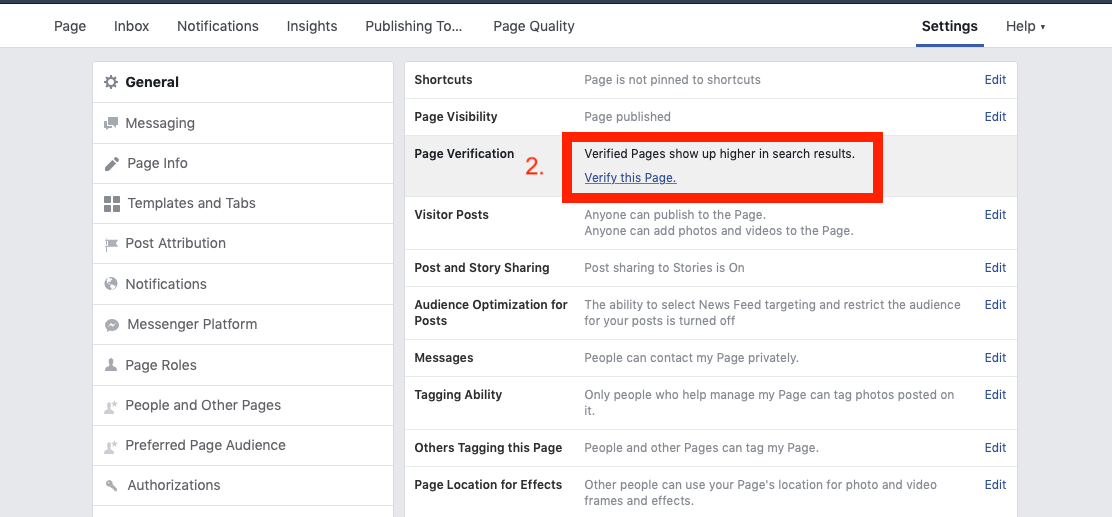
- Navigate to your Facebook Business page.
- Click on “Settings” on the top right of the page.
- Select “General” and find the “Page Verification” section.
- Click on “Verify this Page.”
4. Choose Your Verification Method
Facebook may offer different verification methods, including:
- Phone Verification: Facebook will call the phone number listed on your business page. You will receive a verification code that you will need to enter on Facebook.
- Documents Verification: If you choose this method, you will upload the necessary documents to prove your business’s authenticity.
5. Submit Your Request
Once you’ve completed the previous steps, review all your information and documents, then click “Submit.” Facebook will review your application, which may take a few days to weeks.
What to Do If Your Verification is Denied?
If your verification request is denied, don’t be discouraged. Facebook will typically provide a reason for the denial. Common reasons include:
- Your page is not complete.
- The documentation provided does not match Facebook’s requirements.
- Your business does not have enough followers or engagement.
To reapply, make sure to address any issues indicated by Facebook and improve your page before resubmitting your application.
Tips for a Successful Verification Application
- Keep your business information consistent across all platforms.
- Engage with your audience regularly to increase page activity.
- Use high-quality images for your profile and cover photos.
- Follow Facebook’s Community Standards to avoid any penalties on your page.
Conclusion
Verifying your Facebook Business page is a crucial step in establishing your brand’s online presence. With the added credibility that comes with a verified badge, you can build trust with your customers and make the most out of the features Facebook offers for business pages. Follow the steps outlined in this guide to successfully navigate the verification process. For more detailed guidance, check out our source below:
How to Verify Facebook Business Manager? https://crazyfb.shop/en/page/kak-podtverdit-biznes-menedzher-facebook